
01 / STAFF
Capture the day.
Bring check-ins, observations, documents, and follow-ups into the same working record.
Clear responsibilities. Useful context.Custom software for recovery & family support
Every family update should reflect the work behind it. Connect staff records, manager review, and permissioned family reports in a system shaped around your team.
Founder-led. Scoped to your workflow. Built with your input.
Check-ins · Notes · Follow-ups
Check context. Edit. Approve.
Agreed recipients and permissions
Your practice. Your reporting format.
Illustrative workflow · Tailored during project scoping
Recovery practices
Family & mental-health support
Concierge care teams
One connected workflow
Custom case management software should fit the way your practice works: who records information, who reviews it, and what each family is allowed to see.
Bring check-ins, observations, documents, and follow-ups into the same working record.
Clear responsibilities. Useful context.Give case managers a place to check updates, resolve gaps, and approve the family-facing report.
A human review before sharing.Build reports around agreed recipients and sharing permissions, with internal notes kept separate.
The right information for each audience.Sharing rules belong in the scope from day one: roles, consent requirements, approval steps, and the boundary between internal records and family reports.
Work you can inspect
Explore a custom caregiving implementation and a working case-management demonstration. Each shows a different part of the work.
CLIENT IMPLEMENTATION / PRIVATE PLATFORM
Caregiver records.
Clearer management review.
A custom platform for a 24-hour caregiving business, bringing shift reports, care records, and historical context into one ownership view.
Public case study. The operational platform and client records remain private.
Explore the implementationFICTIONAL-DATA DEMONSTRATION
A closer look at
the reporting workflow.
Follow resident records, staff check-ins, and editable family reports with a separate review and approval step.
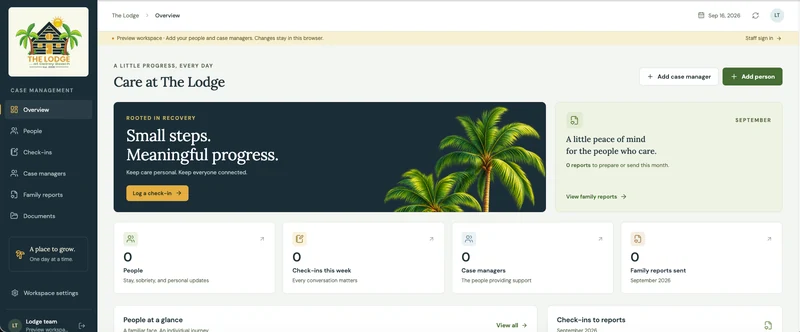
Fictional records. Email and text sending are simulated.
Explore the fictional-data demoDifferent organization? The workflow is the starting point.
Browse all project workA tailored build. An accountable process.
Define the work before committing to a build. Review the system as it takes shape, with scope, responsibilities, and acceptance checks agreed together.

Founder-led delivery
Matthew Mattone leads the conversation, helps define the workflow, and reviews progress with you through delivery.
Meet the founderWalk through your current records, handoffs, reporting, and tools. Identify the first problem worth solving.
Outcome: a shared workflow and clear prioritiesDefine features, permissions, integration feasibility, milestones, and an estimate. Approve the scope before development.
Outcome: a proposal you can evaluateReview working software against agreed scenarios. Define training, handover, and ongoing support as part of your project.
Outcome: a reviewed system and an agreed rollout planBefore we talk
Bring a workflow, a reporting example, or a list of tools. You don’t need a technical specification.
Read the project scoping guideThis is a custom design and implementation service. The examples show relevant work; your system’s features, permissions, and delivery plan are defined for your practice.
We begin by reviewing your current systems and available integration options. The proposal identifies what can connect, what may need a different approach, and what stays in your existing tools.
We scope who prepares a report, who approves it, which recipients are permitted to receive it, and what information stays internal. The Lodge demo illustrates report preparation and approval; sending in that demo is simulated.
Cost depends on the workflow, roles, data, integrations, and rollout requirements. After discovery, you receive a scoped proposal and estimate before deciding to proceed. See what affects custom software cost.
Your workflow is the starting point
Tell Matthew how staff updates become family reports today,
and where your team needs a better way to work.